3× the spend, 50% more often: turning shoppers into omni customers

Landmark Group –
Overview
Most Landmark Group customers shopped in one place: in a store, or, far less often, online. The few who used both were worth far more, so in 2024 we set out to turn more single-channel shoppers into omnichannel customers.
We designed a set of features for the Centrepoint and Max Fashion apps that link a store visit to the app: receipts that live in the app, store stock on every product, a scanner for product tags, and a store rating after every in-store purchase.
- Omnichannel features shipped across the Centrepoint and Max Fashion apps
- 4
I was one of two product designers on the project, working with Diksha Jaiswal, our lead product designer, and with the product and engineering teams.
Why omnichannel
In 2023, before this work, almost nine in ten of our customers shopped offline only.
- Offline only
- 88%
- Online only
- 3%
- Both channels
- 9%
The 9% who shopped both ways were our most valuable customers. Compared with shoppers who used only one channel, in 2023 they:
- More spent each month by omnichannel customers
- 3×
- More frequent shopping by omnichannel customers
- 50%
For store shoppers, the app had to be useful during and after a visit. For online shoppers, it had to give them a reason to visit a store, not leave.
Four ways in
Each feature starts from a moment where a shopper was in one channel and had no reason to reach for the other:
- Where shoppers were: Holding a paper receipt after a store visitWhat we shipped: Digital receipts in the app
- Where shoppers were: Online, looking at a product that’s out of stockWhat we shipped: Find in-store
- Where shoppers were: In a store, with no reason to open the appWhat we shipped: Barcode scanning
- Where shoppers were: Leaving a store, with nowhere to say how it wentWhat we shipped: Store NPS
Digital receipts
Shoppers who give their Shukran number at the till now find that purchase in the app, under a new In-store tab in My Purchases, next to their online orders. Each purchase shows the store, the date, what they bought and how they paid, along with the full tax invoice.
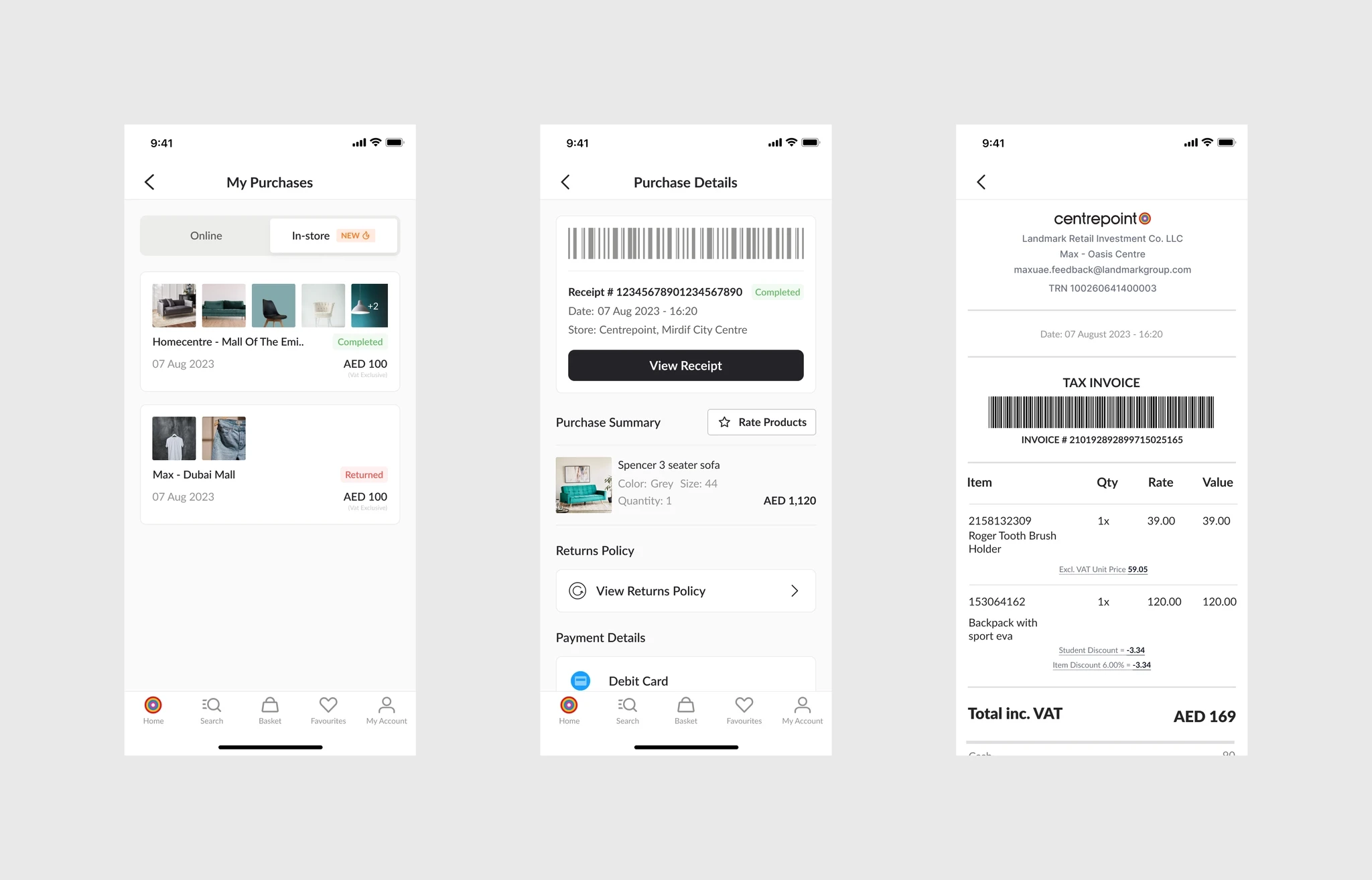
That takes away the need to keep a paper receipt, which is easy to lose, damage or forget, and cuts the paper we print. It also gives the app something it never had before: a record of what each customer bought in store, which we use to make recommendations, offers and messages after a purchase more relevant.
Find in-store
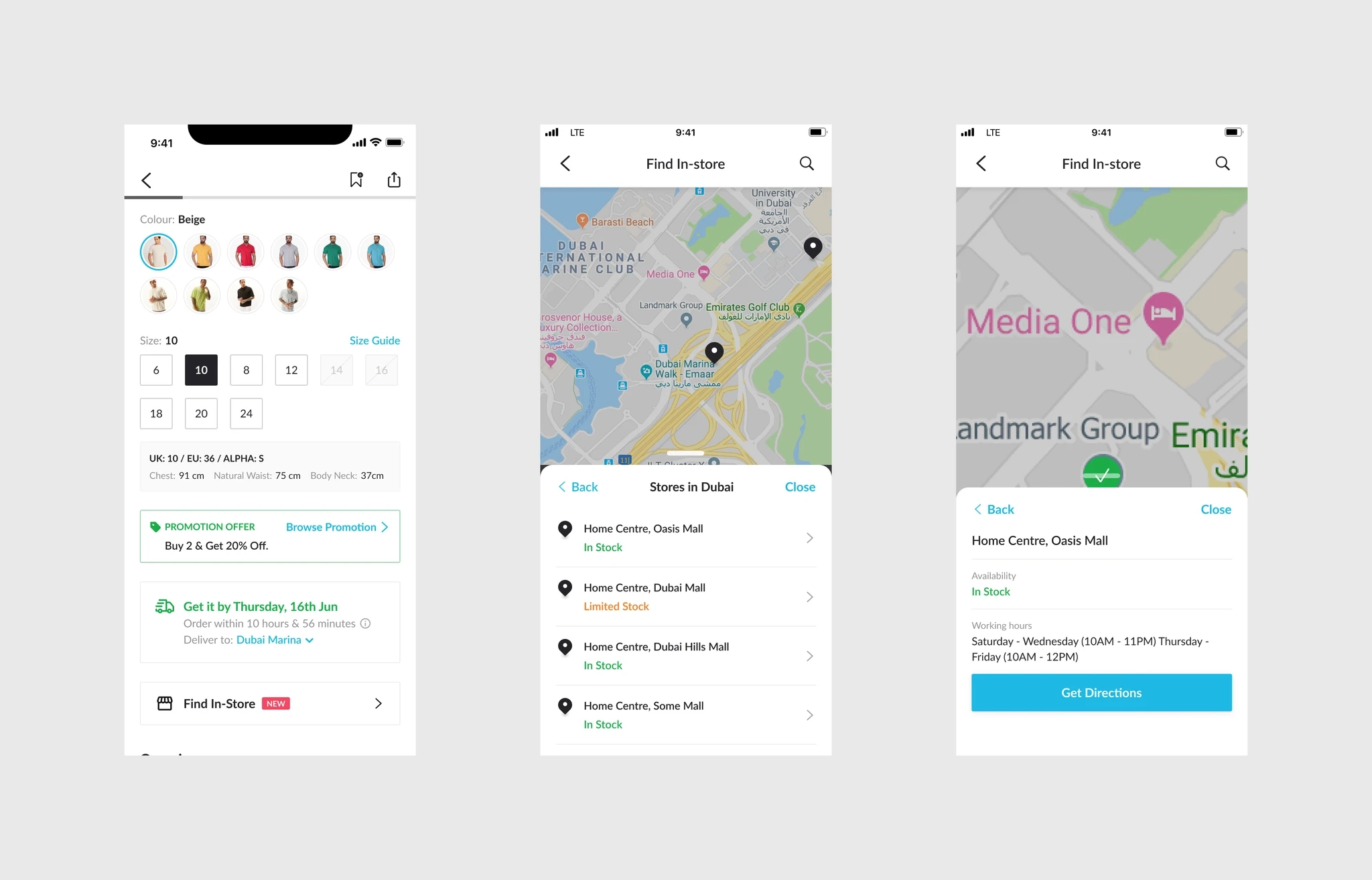
When a size is sold out online, the shopper usually leaves. Find in-store, on every product page, shows which stores in the shopper’s city have the colour and size they’ve picked, and whether stock is limited. From a store, they can check its opening hours and get directions.
Barcode scanning
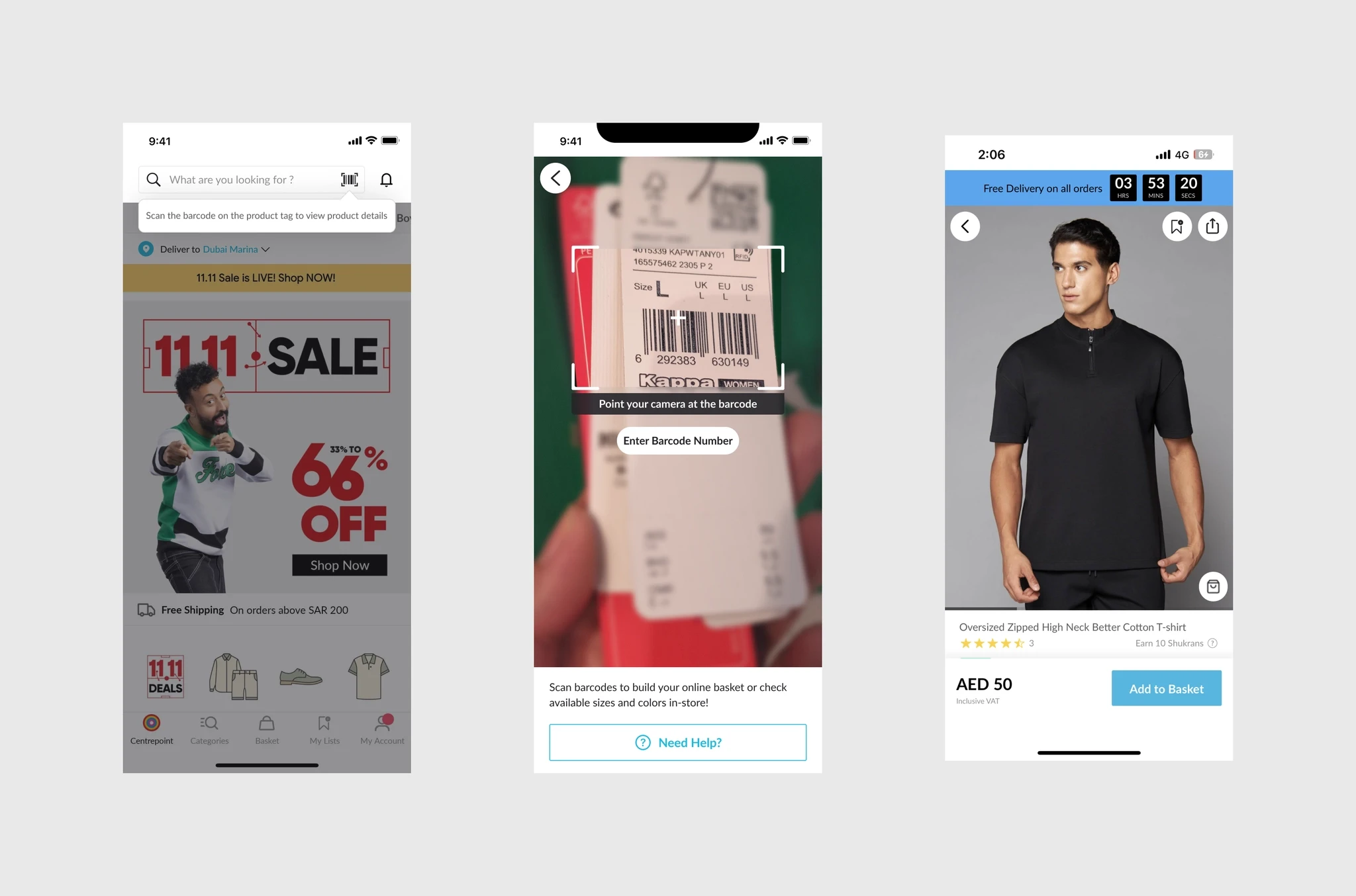
A scan icon in the app’s search bar opens the camera. Pointed at a product tag, it brings up the product page, with every size and colour, reviews and the Shukran points it earns. Shoppers can add it to their online basket and have it delivered rather than queue, or check what’s available before they go looking. If a barcode won’t scan, they can type its number instead.
Store NPS
Digital receipts told us which store each customer had just visited, so we could ask about that visit. After an in-store purchase, the app invites shoppers to rate the store, naming the one they visited. A low score asks what didn’t go well, from the store experience and customer service to the products, delivery, and refunds and returns.
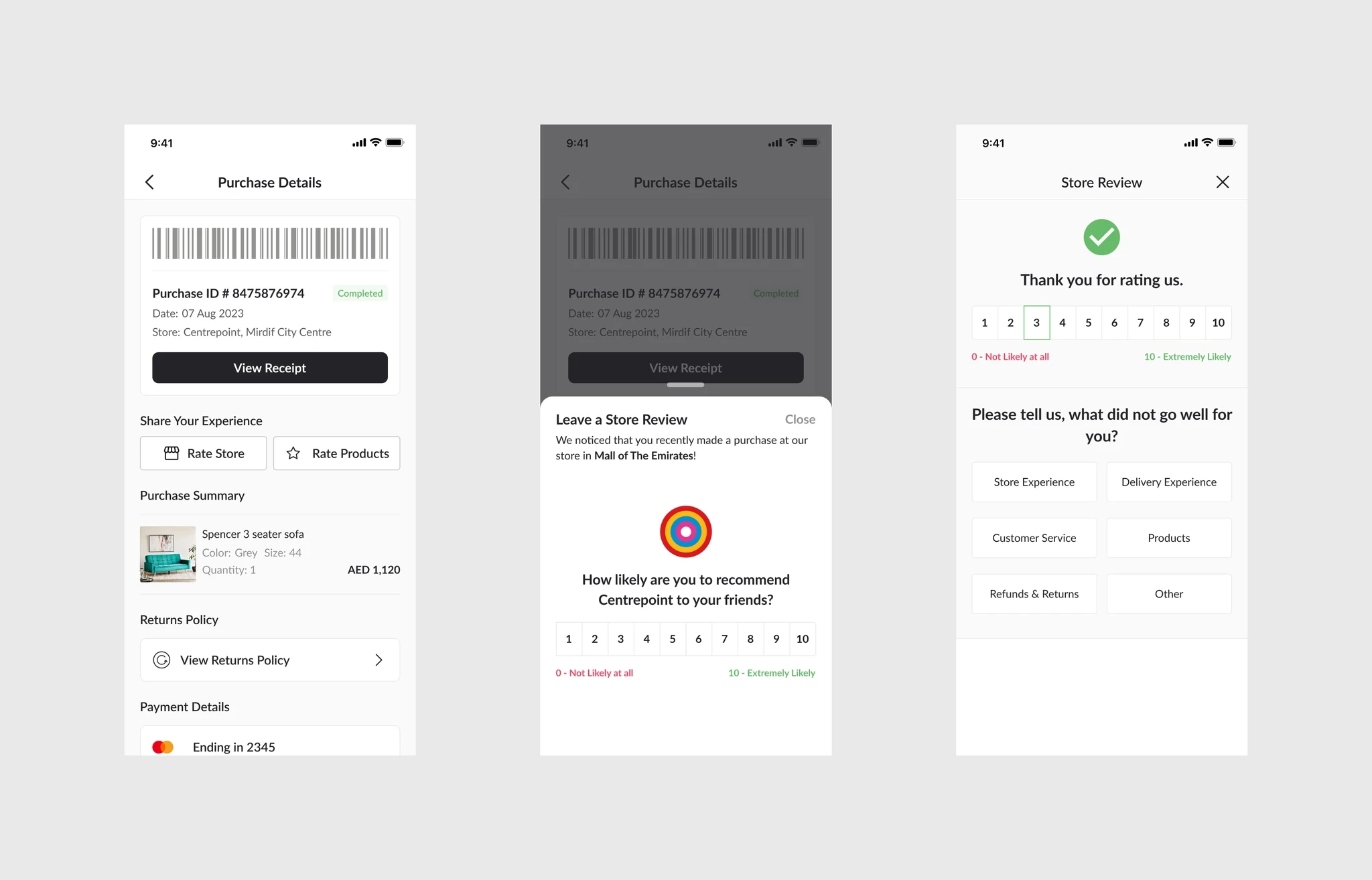
That gives store teams feedback on a specific store and visit, in the same app where the customer already looks back at their purchase.
Review & Earn
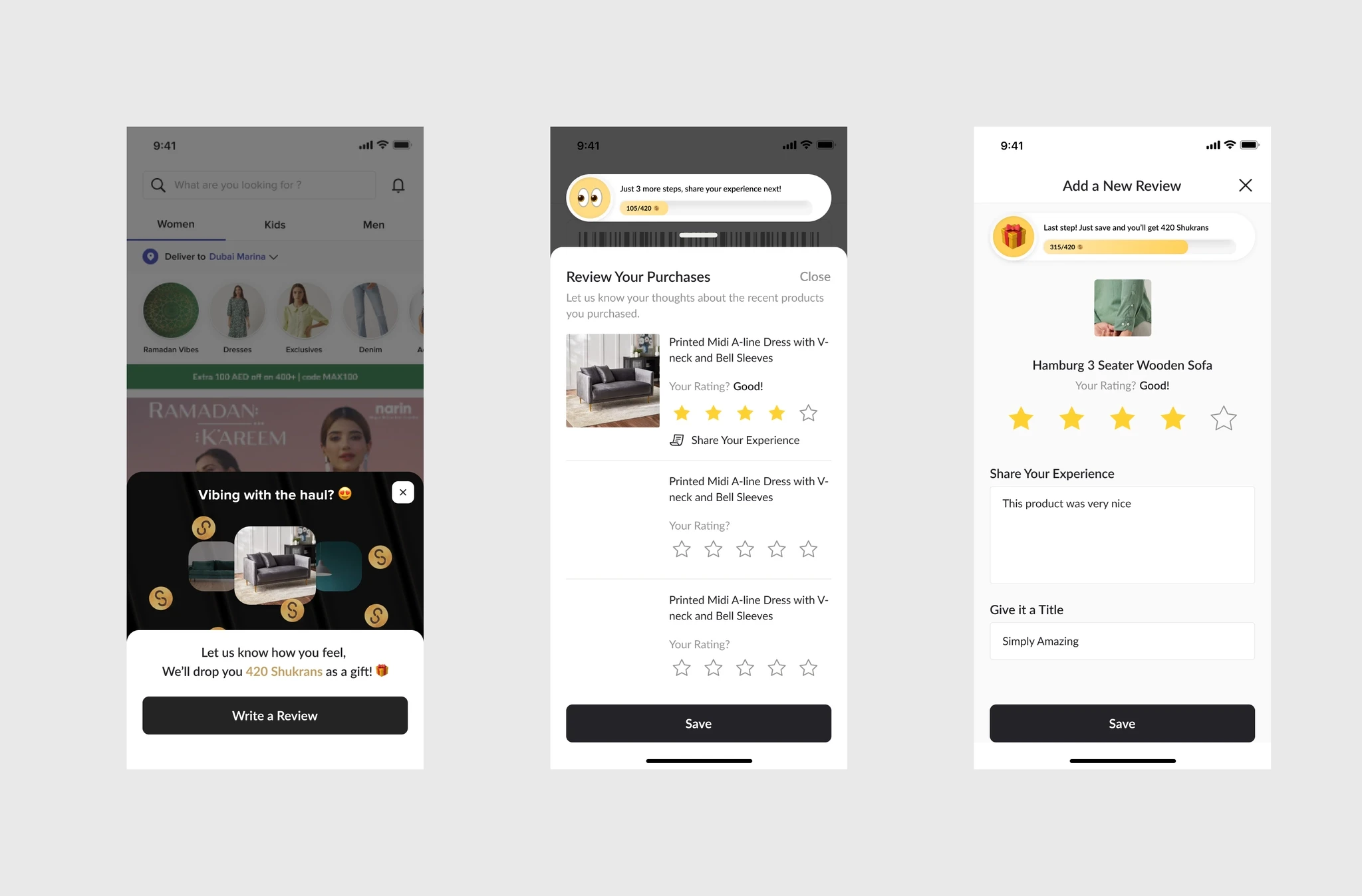
We also designed Review & Earn, which gamifies leaving a review: customers earn Shukran points for reviewing recent purchases, including ones made in store. A progress bar tracks each step, from rating a product to sharing a few words, and a reward is unlocked at the end. It didn’t ship, but it was the next step after Store NPS: rewarding feedback, not just asking for it.
Reflection
None of these features is big on its own. What they share is a moment where a shopper is in one channel and has a reason to reach for the other: a receipt they’d otherwise lose, a size that’s sold out online, a product in their hand. Designing omnichannel turned out to mean finding those small moments, and making the app worth opening in each of them.
Digital receipts also became the foundation for the rest. Once the app knew what someone had bought in store, we could ask them about the visit, and design Review & Earn to reward them for reviewing it.